
Ai workstations
The economics of AI development have shifted.
Once upon a time, the path was clear: spin up cloud instances on AWS, Google Cloud, or Azure and pay by the hour.
But as AI workloads have matured — from quick-prototype notebooks to continuous fine-tuning of large language models on proprietary data — teams are discovering that a dedicated AI development workstation under the desk often delivers faster iteration, stronger data privacy, and dramatically lower total cost of ownership than perpetual cloud spending.
This guide breaks down exactly what hardware and features matter for a modern AI development workstation, compares the best prebuilt options from NVIDIA, HP, Dell, and leading custom integrators, and helps you decide which tier of system matches your team’s workload and budget.
Quick Reference Guide
Navigate directly to the section you need to find specs, standards, and recommendations at a glance:
- Why Move AI Development Local? – Privacy, IP protection, and eliminating cloud bottlenecks.
- Key Hardware Requirements – Specs to consider: GPUs, VRAM, and RAM.
- The Best Prebuilt AI Developer Workstations – Recommended options from NVIDIA, HP, Dell, and custom integrators.
- AI Workstation Selection Decision Tree – A 5-step guide to finding your perfect workstation model.
- Workstation Physical Security – Best practices for keeping your proprietary data secure.
Why Move AI Development, Local?
Cloud computing is undeniably flexible, but flexibility comes at a price — literally. When your ML engineers are iterating on models daily, the hourly charges for high-VRAM GPU instances compound quickly. A local workstation eliminates that variable cost entirely after the initial purchase and gives you two major strategic advantages.
Data Privacy and IP Protection
When you develop AI models on proprietary datasets — patient records, financial transactions, or trade-secret code — every round-trip to a cloud provider introduces data-exposure risk. A local AI development workstation keeps sensitive training data on-premise, simplifying compliance with GDPR, HIPAA, and SOC 2 requirements. There is no cloud egress, no shared tenancy, and full physical control over your storage media.
Eliminating Cloud Bottlenecks
Anyone who has waited 20 minutes for a spot GPU instance to become available on a Friday afternoon understands the hidden cost of cloud AI: latency in the development loop. With a local workstation, your GPU is always available. There are no queue times, no cold starts, and no throttled bandwidth to remote storage. For rapid-iteration workflows — testing prompt engineering changes, fine-tuning LoRA adapters, or evaluating inference pipelines — instant hardware access shaves hours off every development cycle.
Key Hardware Requirements for AI Developers
Choosing the right AI development workstation means understanding which components actually bottleneck your workload. Not every team needs a four-GPU server; some need maximum single-GPU VRAM, while others prioritize CPU throughput for data preprocessing.
GPUs and VRAM: The Most Critical Decision
The GPU is the engine of any AI workstation. For deep learning, what matters most is VRAM (Video RAM) — the memory available on the GPU itself. VRAM directly determines the maximum model size you can load, train, or fine-tune:
| Category | Dedicated VRAM | System RAM | Best For | AI Performance Rating |
|---|---|---|---|---|
| Entry Development | 16 – 24 GB | 64 GB | Prototyping, small 7B models | ⭐⭐⭐ (Good for testing) |
| Mid-Tier Training | 48 GB (Single RTX 6000) | 128 GB | Fine-tuning 13B models, stable diffusion | ⭐⭐⭐⭐ (Great for fine-tuning) |
| Enterprise Pillar | 96 – 192 GB (Multi-GPU) | 512 GB | Foundation model training, 70B fine-tuning | ⭐⭐⭐⭐⭐ (Maximum throughput) |
| The Exception | 128 GB (Unified) | N/A (Unified) | Large model inference on the desk (DGX Spark) | ⭐⭐⭐⭐ (Best VRAM-per-dollar) |
Beyond raw capacity, look for Tensor Cores — specialized processing units in NVIDIA GPUs that accelerate the matrix math at the heart of deep learning. Fifth-generation Tensor Cores in the Blackwell architecture deliver significant speedups for both FP8 training and INT4 inference compared to previous generations, offering up to 5x the throughput of the Ada Lovelace architecture in specific transformer-based workloads.
For multi-GPU setups, verify that your chosen motherboard and CPU platform provide enough PCIe lanes at full bandwidth. Consumer platforms often halve lane allocation when multiple GPUs are installed, crippling throughput. Enterprise workstations usually provide 128 lanes of PCIe Gen 5, ensuring that four GPUs can simultaneously communicate at 128GB/s each without bottlenecking the training process.
The Software Stack: RAM, Storage, and OS
Your GPU does the heavy computational lifting, but the rest of the system must keep up:
- RAM: 64 GB is the minimum for most AI development. If you work with large datasets, run Docker containers alongside training, or use multi-agent frameworks, target 128–256 GB of ECC DDR5 for stability during long training runs.
- Storage: Use a fast NVMe SSD (PCIe Gen 4 or Gen 5) as your primary drive for the OS, frameworks, and active datasets. A second NVMe drive for dataset cache and model checkpoints prevents I/O from starving the GPU. Archive older projects to SATA SSDs or NAS.
- Operating System: Ubuntu Linux remains the gold standard for AI development. NVIDIA’s CUDA toolkit, PyTorch, TensorFlow, and Hugging Face libraries all receive first-class support on Ubuntu. While Windows WSL2 has improved significantly, native Linux avoids the overhead and compatibility edge cases that surface during complex multi-GPU training.
The Best Prebuilt AI Developer Workstations
If you want a machine that works out of the box — with verified drivers, optimized BIOS settings, and professional support — a prebuilt workstation from a reputable vendor is the fastest path to productivity.
The Innovation: NVIDIA DGX Spark
The NVIDIA DGX Spark redefined what a desktop AI workstation can be. At just $4,000, this compact system packs one petaflop of AI compute and 128 GB of unified memory into a form factor small enough to sit beside your monitor. For solo developers or small teams who need to run large language models locally without the complexity of a multi-GPU tower, the DGX Spark is a game-changer. Its unified memory architecture means you can load models that would normally require multiple discrete GPUs into a single, coherent memory space.
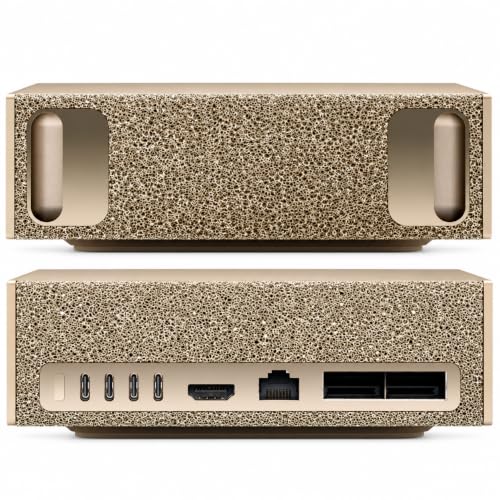
- Warranty Disclosure: The original manufacturer’s warranty is void due to hardware upgrade. This product is covered by a 1-Year seller warranty and LIFETIME seller tech support from the date of purchase.
- LOCAL LLM DEVELOPMENT AND INFERENCE: Built for AI developers and machine learning engineers who want to prototype, test and run generative AI locally. The GB10 Grace Blackwell Superchip and 128GB unified memory are designed to support inference with models up to 200 billion parameters and fine-tuning with models up to 70 billion parameters.
- AI AGENTS, RAG AND CODING WORKFLOWS: Create private chatbots, coding assistants, autonomous agents, tool-using applications and retrieval-augmented generation systems. Local processing reduces dependence on cloud APIs and gives developers greater control over models, data, latency and ongoing usage costs.
- PRIVATE ON-PREMISES AI FOR TEAMS: Designed for startups, enterprises and professional creators that need to keep proprietary code, models and sensitive datasets within their own environment. Its compact desktop form factor, 10Gb Ethernet and ConnectX-7 networking make it practical for offices, laboratories and multi-system AI development.
- ROBOTICS, COMPUTER VISION AND EDGE AI: Suitable for developers creating robotics, smart-camera, computer-vision, industrial automation and edge AI applications. Prototype perception pipelines, multimodal models and intelligent systems locally before moving validated workloads to compatible production infrastructure.
Enterprise Titans: HP Z Series and Dell Precision
For organizations that require vendor support contracts, next-business-day hardware replacement, and ISV (Independent Software Vendor) certifications, the HP Z8 Fury and Dell Precision 7875 are the industry workhorses.
HP Z8 Fury G5: Supports up to four NVIDIA RTX 6000 Ada GPUs, dual Intel Xeon Scalable CPUs, and up to 2 TB of DDR5 ECC RAM. HP’s extensive ISV certification program means your CAD, simulation, and AI software stacks are all validated. A standout feature is the HP Anyware remote access software, which allows you to access your workstation’s full GPU power from a low-power laptop with zero-turn-back latency.
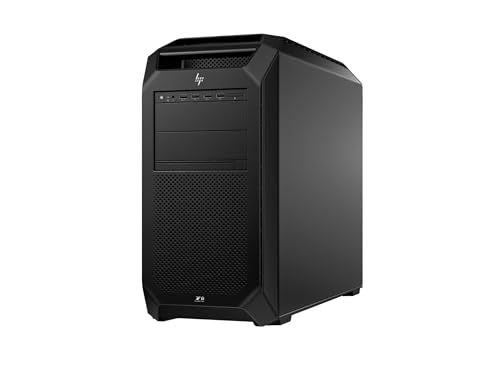
- AI-powered: Yes
- Number of Processors Supported: 1
- Number of Processors Installed: 1
- Processor Manufacturer: Intel
- Processor Type: Xeon
Dell Precision 7875: Built on AMD Threadripper PRO with up to 96 cores, offering exceptional multi-threaded data preprocessing performance alongside multi-GPU expansion. Dell’s ProSupport Plus ensures enterprise-grade uptime with 4-hour on-site response. The Dell Optimizer for Precision uses its own built-in AI to learn how you use your machine learning environment and intelligently tunes performance settings for maximum efficiency in PyTorch-heavy workloads.

- Dell Precision 7920 Tower Workstation
- 2x Intel Xeon Gold 6130 16-Core 2.1GHz (3.7GHz Turbo)
- 192GB DDR4 Memory - upgradable to 1.5TB
- 2x 1TB SSD + 2x 4TB HDD (Removable Hot Swap Drive bays)
- Nvidia Quadro P1000 4GB - Windows 11 Professional 64-bit
Both vendors provide preconfigured AI-ready SKUs with Ubuntu factory-installed and NVIDIA drivers validated, reducing the initial setup time from days of troubleshooting to mere minutes of first-boot configuration. This “out of the box” experience is often the deciding factor for enterprise teams where time-to-market is the primary metric.
Custom Integrators: BOXX, Puget Systems, and Supermicro
When your workload demands a configuration that OEMs do not offer in their standard catalog — such as four RTX 5090s in a whisper-quiet chassis, or a specific NVMe RAID topology — custom integrators fill the gap.
- BOXX Technologies: Known for overclocked single-GPU workstations optimized for inference speed and multi-GPU towers for training. BOXX offers advanced liquid cooling that keeps components at peak performance during 24/7 training runs. Their RAXX series rackmount workstations allow you to start with a desk-side tower and easily migrate the hardware into a data center rack as your team grows.
- Puget Systems: Provides rigorous component testing and publishes detailed benchmark data for every configuration. Their AI development workstations are available in single- and multi-GPU variants and ship with a software stack pre-validated for PyTorch, TensorFlow, and Jupyter. Puget is the choice for researchers who need to know exactly how a specific driver version affects their training epochs.
- Supermicro: Bridges the gap between workstation and server. Their tower systems support up to four professional GPUs with server-grade ECC memory, 10GbE networking, and remote management (IPMI) — ideal for teams that need a workstation that can also serve as a shared inference endpoint for other departments.
AI Workstation Selection Decision Tree
If you are unsure which tier is right for you, follow this 5-step decision tree to narrow down your options:
- Application Type: Are you building chatbots (NLP), generating images (vision), or running simulations? Vision often requires more VRAM than simple NLP inference.
- Requirements and Constraints Evaluation: Is your primary constraint budget (Entry Tier), physical space (NVIDIA DGX Spark), or compute time (Enterprise Multi-GPU)?
- Performance Needs: Do you need to run full-precision training on a 70B parameter model? If yes, you need multi-GPU (Enterprise Tier). If you are just fine-tuning with LoRA, a single-GPU mid-tier is sufficient.
- Quality and Reliability Requirements: If the machine goes down mid-training, do you lose money and project time? If yes, prioritize workstations with ECC memory, redundant power supplies, and next-business-day on-site support (Dell/HP).
- Implementation Complexity Considerations: Do you have a dedicated IT hardware team? If not, buying preconfigured AI-ready SKUs (complete with Ubuntu and PyTorch pre-installed) will save you weeks of frustrating software configuration.
The Future of AI Hardware: Petaflop on the Desk
As we look toward 2027 and beyond, the trend is clear: Unified Memory Architectures. Following the path blazed by Apple’s M-series chips and the NVIDIA DGX Spark, we expect to see more Windows-based AI workstations that blur the line between CPU and GPU memory. This will allow developers to run foundation models with 100B+ parameters without having to split the weights across multiple physical GPU cards, simplifying the code and eliminating the latency of PCIe communication.
Additionally, the adoption of FP8 (8-bit floating point) formats in training is becoming standard. This allows for twice the training speed and half the memory footprint without significant loss in model accuracy. When choosing a workstation today, ensuring that your GPU architecture (Blackwell or newer) has native hardware support for FP8 is a critical future-proofing step.
Frequently Asked Questions
What is the best operating system for an AI workstation?
Ubuntu Linux (22.04 LTS or 24.04 LTS) is the most widely supported OS for AI development. NVIDIA provides first-party CUDA drivers, and all major frameworks (PyTorch, TensorFlow, JAX) are tested primarily on Ubuntu. Windows with WSL2 is a viable alternative for mixed-use machines, but native Linux eliminates compatibility friction during complex training runs.
How much does the NVIDIA DGX Spark AI workstation cost?
The NVIDIA DGX Spark starts at approximately $4,000. It includes one petaflop of AI compute and 128 GB of unified memory, making it one of the most cost-effective ways to run large language models locally.
Is it cheaper to use a local AI workstation or the cloud?
For intermittent, short-burst workloads, cloud compute is often cheaper. But for teams that run GPU-intensive tasks daily — model training, fine-tuning, or continuous inference — a local workstation typically pays for itself within 6-12 months compared to equivalent cloud GPU hours.
How much VRAM do I need for large language models?
Running a 7B parameter model comfortably requires 16 GB of VRAM with 4-bit quantization. For 70B models, you need 48 GB minimum (quantized) or 96+ GB for full-precision fine-tuning. The DGX Spark’s 128 GB unified memory can handle even larger models without quantization.
Can I use consumer GPUs like the RTX 4090 for professional AI development?
Yes. The NVIDIA RTX 4090 offers 24 GB of VRAM and excellent throughput for its price. However, it lacks ECC memory support, has limited multi-GPU scaling (no NVLink), and may not be supported under enterprise vendor contracts. For production-critical environments, professional RTX PRO or A-series GPUs are recommended.
What CPU should I choose: Intel Xeon or AMD Threadripper?
AMD Threadripper PRO offers more PCIe lanes (128 lanes) and higher core counts (up to 96 cores), making it ideal for multi-GPU builds and data-heavy preprocessing. Intel Xeon Scalable processors offer broader ISV certification and AVX-512 acceleration. Choose based on your ecosystem and GPU count.
Do AI workstations come with software pre-installed?
Many vendors — including Puget Systems, Supermicro, and BOXX — ship systems with Ubuntu, NVIDIA drivers, CUDA, and popular frameworks (PyTorch, TensorFlow) pre-installed or available via quick-start scripts. HP and Dell offer Ubuntu factory installations as a build option.
What is the difference between an AI workstation and an AI server?
An AI workstation is a desktop-form-factor machine designed for one or a small team of developers — it has a monitor output, runs a desktop OS, and sits under or on a desk. An AI server is a rackmount system designed for shared, headless use by many users or automated pipelines, often with higher GPU density and redundant power supplies.
How many GPUs do I need?
For inference and fine-tuning adapters (LoRA, QLoRA), a single high-VRAM GPU (24-48 GB) is usually sufficient. For full-precision pre-training or fine-tuning of large models, two to four GPUs with NVLink interconnects provide the throughput needed to keep training times practical.
What cooling is best for AI workstations?
Liquid cooling (AIO or custom loop) is recommended for sustained, multi-hour training runs. Air cooling is cheaper and simpler but may throttle GPU performance when all cards run at full load simultaneously. Ensure your chassis has a well-designed airflow path regardless of cooling type.
How do I handle remote deployment to my workstation?
Use a combination of SSH for command-line access and VS Code Remote Development for a local-like editing experience. For GUI-intensive GPU tasks, HP Anyware (formerly Teradici) or NoMachine provides high-frame-rate, color-accurate streaming of your workstation desktop to your laptop over a standard internet connection.
Workstation Physical Security and Data Retention
When investing $20,000+ in a local AI development workstation, physical security is often overlooked. Since these machines often store proprietary weights and sensitive datasets, you must consider:
- Kensington Lock Slots: Ensure your workstation is physically anchored to the desk or stored in a locked cabinet.
- BIOS Passwords and Secure Boot: Enable hardware-level passwords to prevent unauthorized OS access or drive tampering.
- Drive Encryption (LUKS/VeraCrypt): Always use full-disk encryption. Modern workstation CPUs handle the encryption overhead with zero impact on training performance, ensuring your data remains private even if the hardware is stolen.
- ECC Memory Protection: Beyond preventing crashes, ECC (Error-Correcting Code) RAM protects against “rowhammer” style attacks that can exploit memory bit-flips to escalate privileges or leak model data.
Conclusion
The right AI development workstation depends on your team size, workload, and budget. Solo developers and small teams should look at the NVIDIA DGX Spark for its unmatched memory-to-price ratio. Enterprise teams with support requirements should evaluate the HP Z8 Fury or Dell Precision 7875 for their certified reliability. Researchers with specialized needs will find the most flexibility with custom integrators like BOXX and Puget Systems.
If your budget is limited or you want full control over every component, consider building your own machine — our guide on how to build a machine learning workstation walks you through the entire process from parts to PyTorch. For engineers on the move, don’t miss our comparison of the best AI laptops for developers to find the ultimate mobile rig.
VMinstall.com is a participant in the Amazon Services LLC Associates Program, an affiliate advertising program designed to provide a means for sites to earn advertising fees by advertising and linking to Amazon.com, Amazon.co.uk, Amazon.ca, and other Amazon stores worldwide. *Best Sellers last updated on 2026-10-16 at 10:33.

